BioEureka runs a SaaS platform that helps laboratories, hospitals and research institutions detect bacterial pathogens. As more healthcare and research institutions started using the platform, its existing infrastructure struggled to keep up. Managing databases, servers and routine updates also required support from an external hosting partner.
GoML migrated BioEureka's entire technology stack to AWS managed services over six weeks. The move covered its web applications, backend services, databases and model hosting. Throughout the migration, BioEureka's clients continued using the platform without any downtime.
Project overview
This post covers how GoML planned the migration, moved BioEureka's applications and data to AWS, set up security and monitoring, and shifted traffic without interrupting access to the platform.
Why BioEureka needed a new infrastructure setup
BioEureka's platform previously ran in a hosting environment managed by a third-party partner. As its customer base grew, the existing setup struggled to handle the additional demand. Even routine infrastructure updates depended on external support, which slowed down changes.
The team also had to manage Kubernetes clusters and PostgreSQL databases manually. This added to maintenance work and made updates harder to manage. Monitoring was limited and depended on the hosting partner, while security and compliance controls needed further attention.
BioEureka wanted an infrastructure setup that its own team could manage, with better control over security, databases and application monitoring. It also needed room to handle more users without depending on an external provider for every infrastructure change.
How we planned the AWS migration
Before choosing AWS services, we reviewed BioEureka's existing setup, application requirements and daily infrastructure tasks. GoML looked at where manual work was slowing the team down, which services needed to move, and how to keep the platform available during the transition.
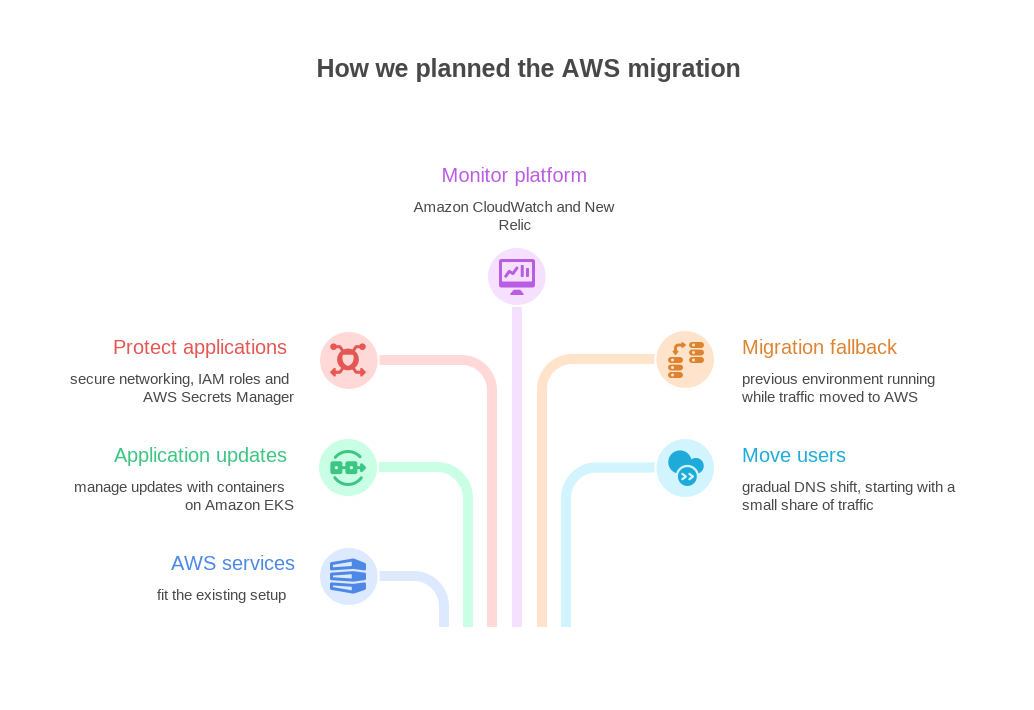
We used these findings to plan the AWS architecture and answer a few practical questions.
Which AWS services fit the existing setup? We selected Amazon EKS for running containerized applications, Amazon RDS for PostgreSQL for database management, Amazon ElastiCache for caching and Amazon SageMaker for model hosting.
How would the team manage application updates? We moved the applications and backend services into containers running on Amazon EKS. This gave the team a consistent way to release and manage updates.
How would we protect applications and data? We planned secure networking, IAM roles and AWS Secrets Manager to manage access and application credentials.
How would BioEureka monitor its platform? We integrated Amazon CloudWatch and New Relic to give the team direct access to application and infrastructure monitoring.
What would happen if something went wrong during migration? We kept the previous environment running while traffic moved to AWS. This gave us a fallback if the new setup faced any issues.
How would we move users without interrupting their work? We planned a gradual DNS shift, starting with a small share of traffic and increasing it as the AWS environment was checked.
Moving the platform in six weeks
GoML divided the six-week migration into six workstreams. Each covered a different part of the platform, allowing us to move applications, databases and model hosting in stages.
- Infrastructure setup: Moved the existing cluster setup to Amazon EKS and configured secure networking, IAM roles and AWS Secrets Manager.
- Database migration: Moved PostgreSQL databases to Amazon RDS and added Amazon ElastiCache for Redis to handle frequent reads.
- Model hosting: Shifted model serving to Amazon SageMaker and configured GPU-backed inference infrastructure.
- Application migration: Moved the Next.js and React applications to AWS and redeployed Python backend services as containers.
- Security and monitoring: Set up Amazon CloudWatch and New Relic, along with authentication and API security controls.
- Traffic cutover: Shifted traffic to AWS in stages while keeping the previous environment available as a fallback.
What GoML set up on AWS
Running applications on Amazon EKS
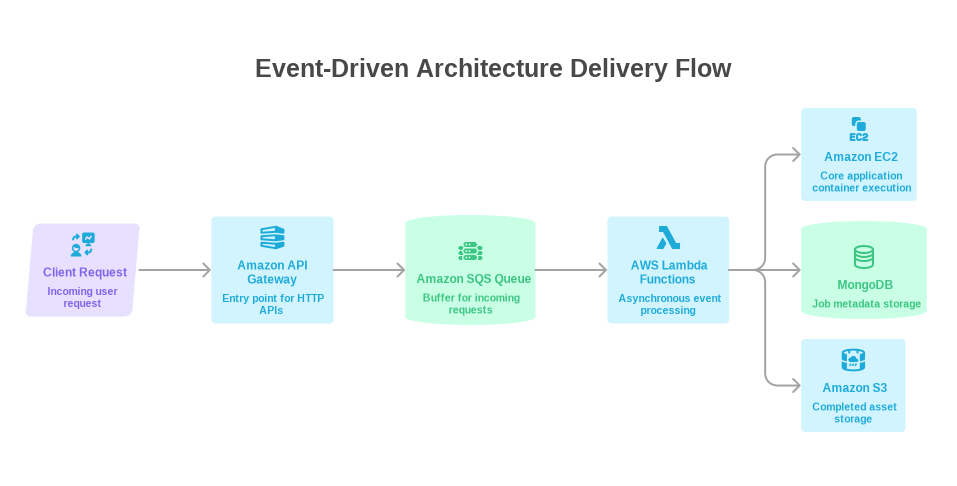
We recreated BioEureka's existing application setup on Amazon EKS, AWS's managed Kubernetes service. We moved the Next.js and React web applications to AWS and packaged the Python backend services into containers. Amazon API Gateway was also included in the architecture to handle API requests.
With the applications running as containers, each service follows the same packaging and deployment process. BioEureka's team can now release updates and manage its services without waiting for the external hosting provider to make infrastructure changes.
Moving databases to managed services
Before the migration, BioEureka's team had to manage PostgreSQL clusters, including routine maintenance, backups and failover tasks.
We moved the databases to Amazon RDS for PostgreSQL. AWS handles routine database maintenance features such as automated backups and high availability, reducing the manual work required from BioEureka's team.
We also added Amazon ElastiCache for Redis to handle frequently requested data. This reduces repeated database queries and helps applications retrieve commonly used information faster. Amazon S3 is also part of the AWS setup.
Moving model hosting to Amazon SageMaker
BioEureka previously deployed and managed its machine learning models manually. The team also had to work around the GPU resources available in its existing hosting environment.
We moved model serving to Amazon SageMaker and configured GPU-optimized inference pipelines. SageMaker manages the model hosting infrastructure, while BioEureka can configure the GPU resources required for inference.
This gives the team a managed way to deploy and run its models without having to maintain the underlying serving infrastructure itself.
Setting up security and access controls
We included security controls in the migration from the start. The new EKS environment uses secure networking and IAM roles to control what each application and service can access.
AWS Secrets Manager stores application credentials separately from the source code. We also set up AWS-native identity services to secure user authentication and API access.
These controls give BioEureka direct access to its security settings. Its team can manage permissions and credentials without relying on the hosting partner for routine changes.
Giving BioEureka direct access to monitoring
The previous monitoring setup depended on the third-party hosting partner. BioEureka had limited access to information about its application's health and infrastructure.
We integrated Amazon CloudWatch and New Relic to give its team direct visibility into applications, backend services and infrastructure.
The team can now check system activity, identify issues and investigate them directly. It no longer needs to raise a support request with the hosting provider every time it needs information about the platform.
How we moved traffic without interrupting users
Laboratories and hospitals use BioEureka's platform for their daily work. Any interruption during migration could affect their operations. We needed a cutover method that would keep the platform available while traffic moved to AWS.
We used a gradual DNS shift instead of moving all users at once. The new AWS environment initially received 10% of incoming traffic. We then increased its share in stages until AWS handled all traffic.
During this period, the previous hosting environment remained active as a backup. If we had found an issue with the new environment, we could have routed traffic back to the previous setup.
Starting with a small share of traffic helped us check how the new environment handled actual user requests before moving everyone over. Keeping the previous setup available also gave us a fallback throughout the cutover.
BioEureka's clients experienced no downtime during the migration.
BioEureka now manages its own infrastructure
The biggest change for BioEureka was gaining direct control over its infrastructure, security and monitoring.
With the move to AWS complete, BioEureka can manage its applications, infrastructure settings and security controls without depending on an external hosting partner for routine changes.
This also changes how the team handles its cloud operations. Managing AWS services requires clear responsibility for production systems, cloud spending and routine maintenance.
Our approach to managing this change starts with reviewing the existing delivery process and identifying the people affected by the move. We then define who will manage each part of the new setup, communicate the changes and train the teams involved.
For BioEureka, this means deciding who manages production, who tracks cloud spending as managed services replace manually maintained infrastructure, and how technical teams and end users stay involved in future changes.
The six-week migration gave BioEureka an AWS environment it can manage directly, while keeping its platform available to the laboratories, hospitals and research institutions that depend on it.