It literally took decades for technologies like the PC and the internet to reach billions of people, but generative AI reached 53% of the world's population in just three years. The Stanford AI Index 2026 reports that AI use among organizations increased from 78% to 88% in a single year, showing how quickly LLMs have moved into everyday business work.
Implementing AI and putting it to work at scale are two different challenges. The report shows that AI agent use is still in the single digits across most business functions. Many companies use AI, but only a few are using AI agents for regular business work at scale.
If you're looking for ways to use LLMs in your product or business, the biggest challenge is choosing the right use case and building it well. At GoML, our Applied AI FDEs help clients choose and test the right models, identify use cases worth building, and take ideas to a 4-day POC and then to production. This guide covers LLM use cases across different industries and job roles.
What is a Large Language Model (LLM)?
A large language model (LLM) is an AI system trained on large amounts of text to understand and generate language. It can answer questions, write content, translate languages, and write code.
Most LLMs use transformers, which understand relationships between words and context and use that to predict the most likely next word. During pre-training, LLMs learn grammar, language patterns, and general information from text without human labeling. Unlike older training methodologies that process text one word at a time, transformers process multiple parts of a sequence at once, making LLMs better at contextualizing content. .
How LLMs are different from traditional AI
Traditional AI and large language models (LLMs) can both help businesses automate work, but they work differently. Traditional AI usually follows fixed rules or learns from labeled data to perform a specific task, while LLMs learn from large amounts of text and can handle many different language tasks using one model.
What work can LLMs handle?
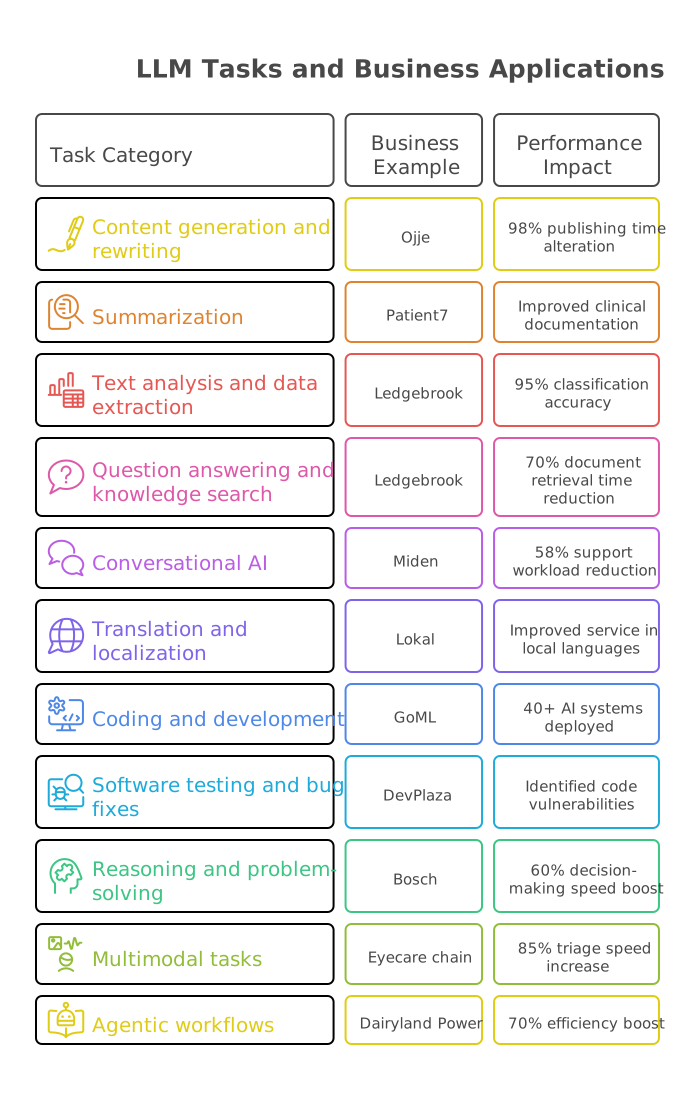
LLMs started as text tools, but they can now read, write, analyze, code, and take action when connected to business systems. Here are the main tasks they handle and how businesses use them.
1. Content generation and rewriting
LLMs can create new content or rewrite existing text quickly.
- Writing: Draft emails, blog posts, product descriptions, reports and documentation.
- Rewriting: Change the tone, style or length of existing text.
- Personalization: Adapt messages for different customers, roles, or markets.
Example: Ojje used AI for story generation to alter its publishing time by 98%.
2. Summarization
LLMs can turn long documents and conversations into shorter summaries.
- Summarize contracts, research papers, financial filings and policy documents.
- Turn meeting and call transcripts into action items.
- Create short summaries of lengthy reports.
Example: Patient7 improved clinical documentation with AI medical transcription and real-time SOAP notes.
3. Text analysis and data extraction
LLMs can turn unstructured text into structured data that businesses can use.
- Classification: Sort support tickets, emails or documents by topic or urgency.
- Sentiment analysis: Identify positive, negative or neutral feedback.
- Information extraction: Pull names, dates, amounts, and clauses from documents.
Example: Ledgebrook used AI for liability code extraction from insurance documents and achieved 95% classification accuracy.
4. Question answering and knowledge search
LLMs can search company knowledge and answer questions in plain language.
- Answer employee and customer questions.
- Search internal wikis, policies and document libraries.
- Use retrieval-augmented generation (RAG) to answer questions using company data.
Example: Ledgebrook's underwriting chatbot cut document retrieval time by 70%.
5. Conversational AI
LLMs can power chatbots and virtual assistants that handle multi-turn conversations.
- Answer customer support questions.
- Guide users through onboarding, troubleshooting or bookings.
- Support internal help desks and learning assistants.
Example: We built a conversational AI chatbot for Miden, a modern issuer processor, that reduced its support workload by 58%.
6. Translation and localization
LLMs can translate content while keeping its meaning and tone.
- Translate product content, support articles and documents.
- Adapt content for different markets.
- Support multilingual customer service.
Example: Lokal used Gen AI to summarize news in local languages, helping it serve readers in the languages they speak.
7. Coding and development
LLMs can help developers write, review, and improve code.
- Write code in Python, JavaScript, SQL and other languages.
- Find bugs, explain errors and suggest fixes.
- Generate tests and documentation.
- Turn business questions into SQL queries.
Example: At GoML, AI coding is a part of how we form solutions for our clients. Our engineers use AI Matic, which is our in-house platform that generates production-ready code from proven blueprints, alongside AI coding agents such as Claude Code. We follow spec-driven development (SDD), defining what the system should do before coding begins so that agents can build against a clear specification. Over the past six months, AI Matic has been used in more than 95% of our AI builds which supports delivery of 4-day POCs to 12-week production systems. This year we have deployed more than 40+ AI systems into production.
7. Software testing and bug fixes
LLMs can help teams test software faster and catch problems before code goes live.
- Find bugs, explain errors, and suggest fixes.
- Generate test cases and review code for common issues.
- Create technical documentation.
Example: We helped DevPlaza use AI agents to review pull requests, identify code vulnerabilities, and suggest improvements to software testing.
8. Reasoning and problem-solving
Reasoning models can work through multi-step problems and compare different options.
- Break down business, math, and logical problems.
- Compare options against specific criteria.
- Support planning and analysis.
Example: Bosch boosted decision-making speed by 60% with a financial analysis AI copilot.
9. Multimodal tasks
Many LLMs can work with text, images, audio, and video.
- Read charts, scanned documents, screenshots, and diagrams.
- Transcribe and analyze calls and meetings.
- Answer questions about images and visual content.
Example: AI for retinal disease detection increased triage speed by 85% for Asia's second-largest eyecare chain.
10. Agentic workflows
When connected to tools, APIs, and business systems, LLMs can complete work instead of just answering questions.
- Break a goal into steps and carry them out.
- Update records, route work, and create actions.
- Pull live data from systems.
- Spin up or call other agents for specialized tasks.
Example: Dairyland Power uses a GoML-built AI powered work order automation that reviews and processes work orders uploaded as PDF or Word files, boosting efficiency by 70%.
Leading LLMs in 2026
Some LLMs perform better at complex reasoning and coding. Others are better at audio and video, offer lower costs, or can be hosted on your own servers. Closed models such as Claude, GPT, and Gemini still lead in overall performance, while open-weight models such as DeepSeek, GLM, and MiMo offer strong performance at a lower cost.
Types of LLMs
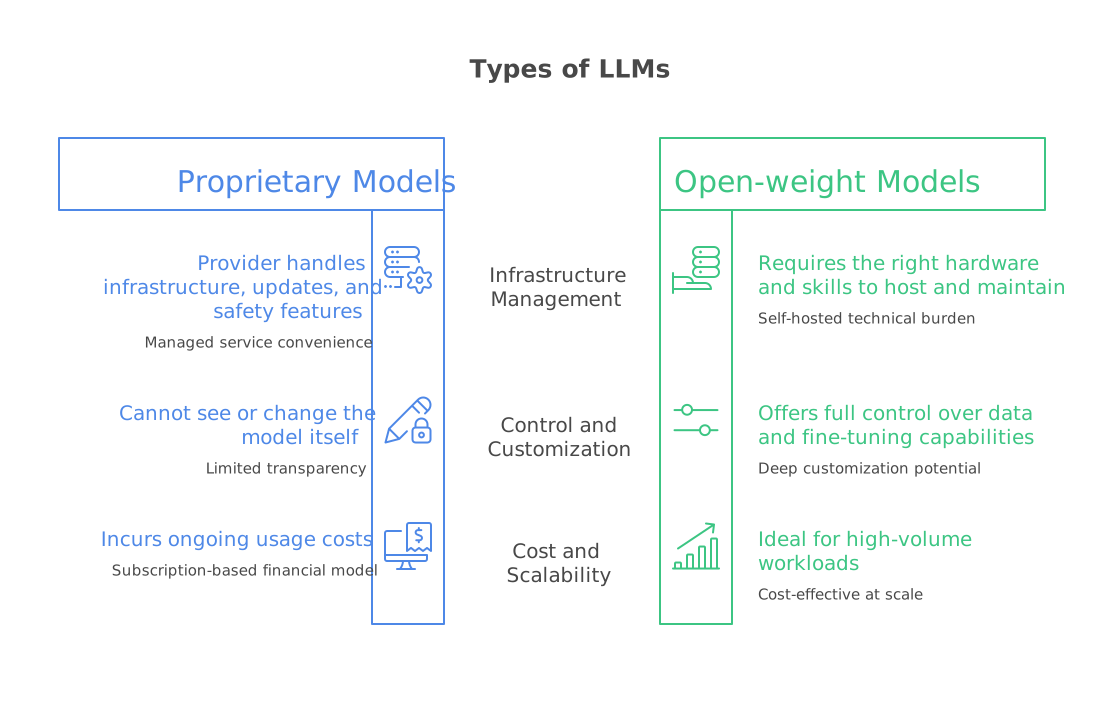
LLMs fall into two main types, based on how you access and use them.
- Proprietary (closed) models run on the provider's own servers and you can use them through an API or app. You can't see or change the model itself. The provider handles infrastructure, updates, and safety features, so teams can get started quickly. These models usually lead on convenience and breadth of capabilities, but they come with ongoing usage costs and limited control over token usage and inference residency.
- Open-weight models let you download the model and run it on your own servers or private cloud. You get full control over your data and can fine-tune the model for your needs, which makes them a strong fit for regulated industries and high-volume workloads. The trade-off is that you need the right hardware and skills to host and maintain them.
Many businesses now use both: proprietary models for broad, open-ended work and open-weight models for routine, data-sensitive work that needs to be performed at scale.
Top LLM providers 2026
These are the companies building the most widely used LLMs today.
Different models have different strengths
All the models have different capabilities and what they built to do sets them apart. Some are better at complex reasoning and coding, while others focus on speed, lower costs, multimodal tasks, or running on your own servers.
- Reasoning: Some models handle complex coding, analysis, and planning well.
- Speed and cost: Smaller models can respond faster and cost less, making them a good fit for simple, high-volume tasks.
- Multimodal tasks: Some models can work with images, charts, documents, audio, and video along with text.
- Agentic work: Many models can use tools, browse the web, and complete multi-step tasks.
Propr ietary models such as Claude, GPT, and Gemini still perform strongly across many tasks, while open-weight models such as DeepSeek, GLM and MiMo can offer strong results at a lower cost.
Top LLMs ranked by intelligence
GoML tracks these models and tests them on real enterprise AI client work. We have also listed the leading LLMs based on the Artificial Analysis Intelligence Index, along with what each model does best based our assessments.
How to choose the right LLM for your use case
Choose the right LLM according to your needs, not the model everyone is talking about. Define your requirements, compare models against them by testing their performance with real data before deciding.
Do not consider model at first, begin with the task
Before checking any leaderboard, answer three questions:
- What should the model do? Answer FAQs, summarize reports, extract data from forms, write code, or handle a multi-step agent? Each task needs different model capabilities.
- How complex is the task? A simple FAQ bot needs less reasoning than a tool that reviews contracts or supports complex decisions. Using a top-tier model for a simple task can also increase costs without adding much value.
- What type of data will it handle? Text, scanned documents, images, audio, or video? This can quickly narrow down your model choices.
Set you requirements before comparing models
Use benchmarks to shortlist, then test with real data
Public leaderboards can help narrow dozens of models down to two or three. But a high score does not guarantee good results for your use case. A model may perform well on general tests but struggle with industry terms, document formats, schema, or customer questions.
The final choice should come from testing the models on your own work. Collect real examples from your workflow and define what a good answer looks like for each one. Run them through every shortlisted model and compare:
- Accuracy and completeness
- Latency
- Performance on edge cases
- Token and cost per activity
Use the same scoring criteria for every model. For larger test sets, an LLM can help evaluate responses, with human reviewers checking the results. Keep adding real failures to the test set so future model and prompt changes are tested against known issues.

Score each model side by side
Rate each shortlisted model from 1 to 5 on the factors that matter most to your use case, such as accuracy, speed, cost, privacy, and integration. Give higher weight to the factors that matter more. For a legal review tool, accuracy may count twice. For a high-volume support bot, cost and speed may matter more.
This process may show that no single model performs best across every category. That is normal. Many teams use more than one model, with a stronger model for complex tasks and a faster, lower-cost alternative model for routine work.
Test one use case first
When your model choice is made, built out the first iteration or prototype of your use case. Set clear goals such as time saved, accuracy, or faster results. If it meets your goals, you can expand its use.
At GoML, we adopt the same methodology with our clients. We define the ask, set the requirements, test a few models with real data, and then compare the results. This helps us choose a model based on actual results. After that, we move from a quick proof of concept to a pilot and finally to production.
The drawbacks with subjective model testing
Many teams test an LLM by trying a few prompts, reading the answers, and choosing the model that feels best. I get it, it's easy and we’re trained to form immediate impressions. The approach can be disastrous for picking LLMs for enterprise use cases. It may work for an initial check, but it is just not enough to choose an LLM for production scale. Here’s why.
The same prompt can give different answers
Traditional software is deterministic. The path from input to output is clear, programmed, and verifiable. But LLMs can give different outputs each time because their responses are based on probabilities.
Even small changes in wording or punctuation can affect the result. Model providers regularly release updates that can change how a model responds, so a prompt that worked well on a different model may behave differently on a newer (or older) model without manual testing catching the change. Prompt regressions are still not an established practice.
People judge answers differently
Most LLM tasks do not have one correct answer, so an individual may find a response clear and useful while another may not. Reviewers also prefer answers that sound confident or look well written even when the facts are wrong. And LLMs are very good at confidently sharing responses that are plain wrong.
Without the same scoring rules for everyone, test results can depend more on who reviews the answer than on the quality of the model.
A few prompts are not enough
Real users ask questions in many different ways. They may make typos, leave out details, ask vague questions, or have long conversations. Testing only a few prompts covers a small part of real use. This means the problems that appear in production can easily be missed during manual testing.
Manual testing takes too much time
Writing prompts, checking responses, and recording issues by hand takes time. Every new model or prompt change means repeating the same work. This can slow down testing and make it harder to catch problems before launch.
Hidden risks can be missed
Quick manual tests may not catch issues such as prompt injection, attempts to bypass safety rules, sensitive data leaks, biased responses, or confident but incorrect answers. These issues need planned testing to find them.
Benchmark scores are not enough
Public benchmarks can help compare models, but they do not show how a model will perform in your system. Your prompts, data, retrieval setup, and tools also affect the final response. A model with a high benchmark score can still fail when working with your documents, terms, or workflows.
LLM use cases in different industries
Every industry works with large amounts of information, much of it in language, from patient records and financial reports to contracts, support tickets, and policy documents. LLMs can help across industries, but their use differs by business needs: hospitals need accurate clinical notes, banks need reliable risk analysis plus retailers need fast customer support.
At GoML, we have delivered 100+ generative AI projects across healthcare, financial services, manufacturing, retail, education, SaaS etc. The strongest LLM use cases solve a clear industry problem rather than using AI for its own good.
This section covers practical LLM use cases across major industries, with real examples from our work.
LLM use cases in healthcare
Healthcare teams handle large amounts of information, including clinical notes, patient histories, medical records, and care plans. LLMs help process this information faster, reduce paperwork, and support better patient care. This gives clinicians more time to focus on their patients.
Longitudinal patient data analysis
Longitudinal patient data analysis means reviewing a patient's health records over time to see how their condition changes. AI helps by bringing records and clinical notes from different sources together, making it easier to understand a patient's health history. For Max Healthcare, GoML built a generative AI copilot that connects to the hospital's health record systems and maps each patient's medical history. So that doctors can track changes in a patient's health and spot diagnosis trend which helps them provide the right care early.
Patient health risk prediction
Patient health risk prediction means using patient data to identify people who may face serious health problems. AI helps by reviewing large amounts of medical history and flagging risks that may be missed during manual reviews. At Atria, up to 40% of high-risk cases were missed or flagged too late, so GoML built an AI platform for patient health risk prediction with a simple dashboard for clinicians. Atria can now predict and prevent patient health risks 50% better.
Medical transcription and SOAP note generation
Medical transcription and SOAP note generation means turning conversations between doctors and patients into structured clinical notes. AI can listen to these conversations and sort the details into the right sections automatically. For Patient7, GoML built an AI system for medical transcription and SOAP note generation that creates clinical notes in real time. This reduces the time doctors spend on documentation and gives them more time to focus on patients.
Radiology report generation
Radiology report generation means turning a radiologist's findings into clear, structured reports. AI speeds up this process by converting spoken dictation into organized reports, reducing manual typing. For NewVue, GoML built an AI assistant for radiology report generation that uses medical-grade speech recognition to create reports from dictation. This gave radiologists 2× visibility into their reporting.
Clinical intake automation
Clinical intake automation means digitizing and organizing the forms and documents patients fill out before care begins. AI reads unstructured intake documents and turns them into structured, editable forms automatically. For WizTherapy, GoML delivered a 4-week, HIPAA-compliant solution for clinical intake automation. This cut manual intake effort by 80% and sped up clinical onboarding.
Mental health support chatbot
A mental health support chatbot gives people a place to talk and get wellness guidance whenever they need it. It can respond naturally and suggest support based on each person’s needs. For Enrichly, GoML built an AI mental health support chatbot that combines conversations with personalized recommendations, making wellness support more accessible to young people.
Personalized pediatric nutrition planning
Personalized pediatric nutrition planning helps create meal plans based on each child’s health and dietary needs. AI can adjust recipes and food recommendations to suit these needs. For Heartful Sprout, GoML built an app for personalized pediatric nutrition planning that adapts recipes to each child’s medical conditions and dietary requirements, improving dietary consistency by 50%.
Value-based care settlement analysis
Value-based care settlement analysis involves reviewing healthcare contracts where payments depend on patient outcomes and care costs. AI helps simplify this by analyzing financial and clinical data to calculate settlements. For Paramean, GoML built an AI financial assistant for value-based care settlement analysis that helps teams manage complex settlements. This made settlement analysis faster and easier for Paramean’s teams.

LLM use cases in finance and insurance
Banks, insurers, and fintech companies process large amounts of transactions, reports, policies, and claims every day. LLMs help them analyze information faster, identify risks sooner, and provide customers with quicker, more personalized service.
Fraud detection and transaction monitoring
Fraud detection and transaction monitoring involves checking financial transactions for suspicious activity. AI speeds up this process by scanning large numbers of transactions and flagging unusual patterns in real time. For Miden, a modern issuer processor, GoML built an AI tool for fraud detection and transaction monitoring that flags risky transactions for analysts to review. This reduced fraud detection time by 82%.
Transaction classification
Transaction classification means sorting financial transactions into categories such as groceries, rent, and travel. AI automates this by reading transaction details and assigning the right category, even when descriptions are unclear. For GetAsset’s personal finance app, GoML migrated the system to Amazon Bedrock and built AI for transaction classification. This helped the app achieve 90% data accuracy.
Personalized financial advice
Personalized financial advice helps people make money decisions based on their income, spending habits, and financial goals. AI supports this by analyzing personal financial data and suggesting options suited to each user. For Kashvisor, GoML built a generative AI financial advisor that provides personalized financial advice using each user’s banking data. This gives users financial guidance tailored to their needs without requiring a human advisor for every interaction.
Financial report generation
Financial report generation involves turning accounting data into clear and accurate reports. AI can speed up the process by collecting relevant figures and preparing report drafts automatically. For AccountBridge, which helps nonprofits manage their accounting, GoML built generative AI software for financial report generation. This helped nonprofit teams spend less time preparing reports and made their accounting work easier to manage.
Natural language financial data querying
Natural language financial data querying lets users ask questions about financial information in plain English instead of writing code or waiting for data teams. AI interprets these questions, retrieves relevant data, and returns answers quickly. For Indus Valley Partners, GoML built AI hedge fund software for natural language financial data querying. This reduced data turnaround time by 85%.
DeFi investment assistance
DeFi investment assistance helps users compare opportunities in decentralized finance, where investment options and returns can change quickly. AI can analyze yield farming opportunities and explain the available options in simple terms. For The Connecter, GoML built an AI assistant for DeFi investment assistance that analyzes yield farming options. This helped increase user engagement by 72%.
Underwriting knowledge search
Underwriting knowledge search helps insurance teams find relevant information in policies, guidelines, and documents when assessing risk. AI makes this easier by understanding questions and retrieving relevant answers from documents. For Ledgebrook, GoML built an AI chatbot for underwriting knowledge search that helps underwriters find information quickly. This reduced document retrieval time by 70%.

LLM use cases in manufacturing
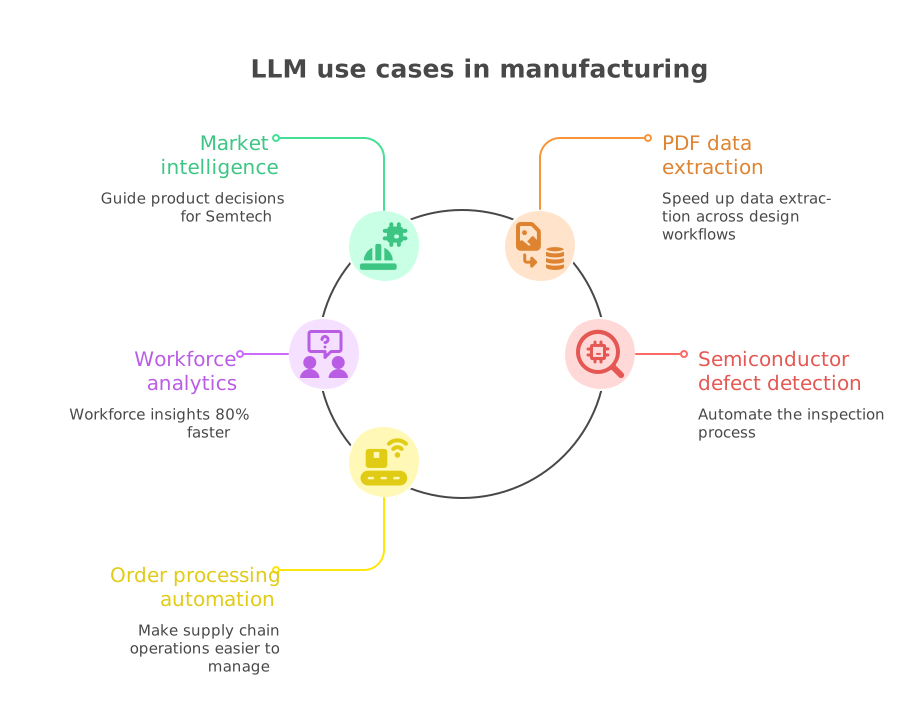
Manufacturers manage complex technical documents, supply chains, and operational data across teams and systems. LLMs help them understand this information, automate routine tasks, and make better decisions about product planning, quality checks, and daily operations.
Market intelligence for product planning
Market intelligence for product planning means studying market trends, demand, and competitors to decide which products to build next. AI makes this faster by collecting signals from many sources and turning them into clear insights. For Semtech, a semiconductor company, GoML built an AI system for market intelligence that analyzes market signals to guide product decisions. This helps Semtech make informed choices about which chips to design next.
PDF data extraction
PDF data extraction means pulling useful information out of documents like technical drawings, specs, and reports. AI handles this by reading complex PDFs and capturing the right data automatically, even from detailed technical layouts. For Podium Automation, which designs industrial control panels, GoML combined machine learning and LLM models to build a solution for PDF data extraction. This sped up data extraction across its design workflows.
Workforce analytics
Workforce analytics means studying employee data, like headcount, skills, and attrition, to make better people decisions. AI makes this easier by letting teams ask questions in plain language instead of building reports by hand. For Bosch, GoML built a conversational AI tool for workforce analytics that gives HR teams instant answers from workforce data. This delivered workforce insights 80% faster.
Semiconductor defect detection
Semiconductor defect detection means finding tiny flaws in chips during manufacturing before they reach customers. AI speeds this up by analyzing inspection images automatically and spotting defects that are hard to catch by eye. For Sigray, which builds X-ray inspection systems, GoML built an AI system for semiconductor defect detection that reviews X-ray images automatically. This helped automate the inspection process.
Order processing automation
Order processing automation means handling orders from the moment they arrive until they’re fulfilled, without manual steps. Agentic AI makes this possible by reading orders, checking details, and completing each step on its own. For StockyAI, which connects agricultural producers, distributors, and retailers, GoML built an agentic AI engine for order processing automation. This made supply chain operations easier to manage.
LLM use cases in SaaS
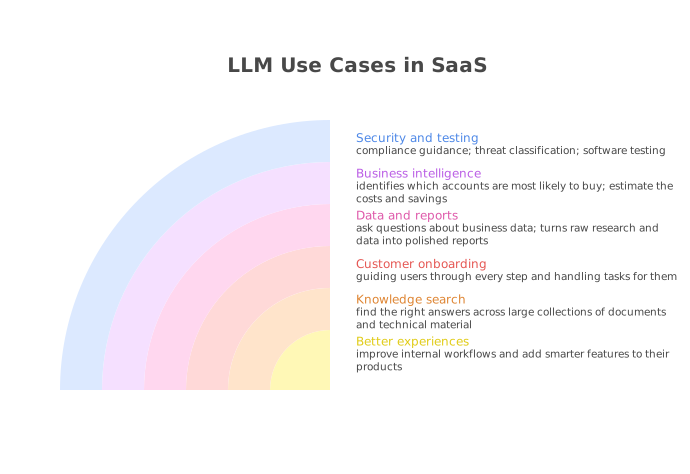
SaaS companies use LLMs to improve internal workflows and add smarter features to their products, helping them offer better user experiences, faster support along with new AI capabilities.
Knowledge search
Knowledge search helps users quickly find the right answers across large collections of documents and technical material. AI speeds this up by grasping what the user is asking and linking related details from many sources. For Tungsten Automation, GoML built a GraphRAG chatbot for knowledge search that handles detailed certification questions. This gave users rich, accurate answers at scale.
Customer onboarding automation
Customer onboarding automation helps new users get set up and start getting value quickly. Agentic AI does this by guiding users through every step and handling tasks for them along the way. For Experio Labs, GoML built an AI onboarding agent designed for consulting and professional services teams. This sped up onboarding for enterprise clients.
Conversational data insights
Conversational data insights let users ask questions about business data in everyday language and get answers right away. AI converts each question into the correct data query and presents the results in a clear way. For MyIntelliSource, GoML built a conversational data insights engine focused on income statement analytics. This allows business users to explore financial data without needing technical skills.
Report generation
Report generation turns raw research and data into polished reports that are ready to share. AI makes this quicker by collecting information, pulling out key points, and writing the first draft automatically. For Hiswai, GoML built an AI system for report generation that brings together insights from across the web. This made market intelligence gathering much simpler.
Sales signal intelligence
Sales signal intelligence identifies which accounts are most likely to buy based on how they behave. AI improves accuracy by reviewing large amounts of buyer activity and pointing out the best opportunities. For Kinetik, GoML built a gen AI platform for sales signal intelligence serving B2B technology companies. This raised sales signal accuracy by 60%.
Regulatory compliance guidance
Regulatory compliance guidance helps organizations understand and follow complex security and compliance requirements. AI makes this easier by reviewing regulations and turning them into clear, practical advice. For RISCPoint, GoML built gen AI software for regulatory compliance guidance inside its RADAR platform. This helps clients get compliance answers more quickly.
Threat classification
Threat classification groups security threats into known attack types so teams know how to act. AI speeds this up by reviewing threat details and mapping them to frameworks like MITRE ATT&CK automatically. For Rilevera, GoML built AI for threat classification within its security detection platform. This helped security teams categorize threats more accurately.
Software testing
Software testing checks code for bugs, gaps, and security weaknesses before it’s released. AI agents make this quicker by reviewing code, finding the cause of failures, and recommending better tests. For DevPlaza, GoML built AI agents for software testing across the full development lifecycle. This made DevPlaza’s software more reliable.
Decarbonization financial analysis
Decarbonization financial analysis helps businesses estimate the costs and savings of switching to cleaner energy. AI speeds up the work by researching available options, comparing costs, and preparing plans. For Ampere Financial, which helps small and mid-sized businesses reduce their environmental impact, GoML built an AI copilot for decarbonization financial analysis. This reduced the time spent on research and planning by 50%.
LLM use cases in education
Schools, EdTech platforms, and training providers use LLMs to personalize learning support and create educational content faster.
Personalized learning
Personalized learning adapts lessons, practice, and feedback to each student’s level and pace. AI supports this by tracking student performance and adjusting the next learning steps. For Junction Education, GoML built a personalized learning platform that tailors learning content to every student. This allows students to learn at their own pace with material suited to their needs.
AI-assisted coding education
AI-assisted coding education helps beginners learn programming by guiding them through real projects. AI makes this easier by turning learners’ ideas into working code they can test and understand. For AngelQ, GoML built a coding platform for kids with a safe, block-based environment. This helps children learn coding through fun, hands-on activities.
Educational content generation
Educational content generation involves creating stories, lessons, and reading material for learners in less time. AI helps by producing age-appropriate drafts that educators can review and publish. For Ojje, GoML built an AI system for story generation to support its interactive reading platform for children. This alters publishing time by 98%.
Career guidance assistant
A career guidance assistant helps learners understand different career options and the skills needed for each one. AI makes this guidance more personal by answering questions and recommending paths based on individual interests. For BlueRecruit, GoML built and scaled an AI career assistant that provides personalized guidance for careers in skilled trades. This helps users make informed decisions about their future careers.

LLM use cases in retail and e-commerce
Retailers and online stores need to help customers quickly and give them a more personal shopping experience. LLMs help shoppers find the right products, get quick answers to their questions, and receive offers and content based on their interests.
AI shopping assistant
An AI shopping assistant helps customers find suitable products through natural, two-way conversations. AI makes these recommendations more personal by understanding each shopper’s needs, style, and budget. For SeededHome, GoML built a conversational AI shopping assistant that helps customers choose the right furniture. This increased conversions by 40%.
Product search and recommendations
Product search and recommendations help shoppers find what they need across large product catalogs. AI improves this process by understanding what customers are looking for and suggesting relevant products. For Techatomic, GoML built an AI search and recommendation engine for a catalog containing more than 20 million products. This reduced search abandonment by 25%.
Personalized marketing notifications
Personalized marketing notifications send customers offers and updates based on their interests. AI supports this by analyzing customer behavior and selecting suitable messages and delivery times. For Goodiebag, GoML built AI for personalized push notifications on its marketplace. This helped increase customer engagement and sales.
Social media content analysis
Social media content analysis involves reviewing posts and creator content to understand what attracts attention and drives sales. AI speeds up this process by analyzing large amounts of content and identifying key themes, products, and trends. For SimplicityDX, GoML built generative AI for social media content analysis to support brands’ creator storefronts. This helps brands use creator content to improve the shopping experience.
Employee training
Employee training helps retail and service staff understand work processes and answer customer questions with confidence. AI supports faster training by providing instant answers and learning materials whenever staff need them. For HelloWash, GoML built an AI training platform for its support teams. This improved training efficiency by 60%.

LLM use cases in government and public sector
Government agencies manage large volumes of citizen requests, public records, and policy documents. LLMs help staff respond to queries faster, review documents and communicate with citizens in their preferred language.
Citizen grievance management
Citizen grievance management involves handling public complaints and requests, directing them to the right department, and helping resolve them quickly. AI speeds up this process by understanding complaints, sorting them by topic and urgency, and explaining the steps in simple language. For CPGRAMS, India’s public grievance system, GoML built a conversational AI grievance management engine. This helps citizens file and track complaints more easily while helping government agencies respond faster.
Constituent communication
Constituent communication involves responding to the large number of messages that government offices receive from the public. AI helps staff handle these messages faster by identifying the issue and drafting clear, accurate replies for review. For Civic, which builds communication platforms for congressional offices and state legislatures, GoML built an AI email response generator. This improved efficiency by 62%.

LLM use cases in legal services
Legal teams spend a lot of time reviewing contracts, reading case files, and searching through regulations. LLMs help them find important details faster, review large numbers of agreements, and meet legal requirements, while lawyers make the final decisions.
Contract analysis
Contract analysis involves reviewing agreements to identify key terms, obligations, and important details. AI speeds up this process by reading lengthy contracts and organizing their contents into structured, searchable data. For Plumbata, GoML built contract automation software that extracts and analyzes information from union agreements. This makes complex contract data easier and faster to review.
Due diligence document search
Due diligence document search involves finding important information across large collections of confidential deal and legal documents. AI makes this easier by understanding questions and retrieving answers from relevant documents. For Hadaly, GoML built an AI chatbot system for due diligence, with secure access controls based on each user’s role. This helped M&A teams complete due diligence tasks faster.
Legal compliance automation
Legal compliance automation involves checking that business activities follow the laws and rules that apply to them. AI helps simplify this process by reviewing requirements, assessing their complexity, and preparing compliant campaign setups. For Trymark Promotions, GoML built sweepstakes management software that manages legal compliance for promotional campaigns. This reduced setup time by 70%.

LLM use cases in media and content
Media companies and content platforms face pressure to produce, manage, and personalize content faster. LLMs support these tasks by drafting content, reviewing user posts, organizing media libraries, and tailoring recommendations to audience interests.
Social media content generation
Social media content generation involves creating posts that fit a brand’s voice and keep pace with ongoing conversations. AI speeds up this process by drafting relevant, timely posts that teams can review and publish. For Hemera, GoML built an AI tweet generator that creates engaging posts for the crypto community on X. This helps Hemera stay active and visible in a fast-moving space with many competing voices.
Local-language news summarization
Local-language news summarization involves turning news stories into short, easy-to-read summaries in the languages people speak. AI makes this possible by shortening articles and generating summaries and headlines in regional languages. For Lokal, GoML built AI for news summarization in local languages for its hyperlocal news platform. This helps Lokal deliver quick, easy-to-understand news to readers in their own language.
Content moderation
Content moderation involves reviewing user-uploaded content to keep platforms safe and remove harmful material. AI speeds up this process by scanning content automatically and flagging anything that violates community rules. For Biome, a social platform for Gen Z users, GoML built AI content moderation for images shared by users. This made image moderation faster and helped the platform handle content more safely.
Personalized content recommendations
Personalized content recommendations show users posts, articles, or videos that match their interests. AI improves these recommendations by learning from user behavior and ranking content based on individual preferences. For Mantel, GoML built a generative AI content recommendation system that powers a personalized feed. This helps users see content that is more relevant to their interests.
Media asset management
Media asset management involves organizing large collections of images and other media so teams can find and use them quickly. AI simplifies this process by automatically tagging, sorting, and describing assets. For Dropt, which supports fan loyalty platforms for sports teams and creators, GoML built a generative AI image management system. This changed how sports media teams organize and manage their image libraries.

LLM use cases for different job roles
LLMs are changing how teams handle their daily work across industries. From finance and sales to HR, operations, and healthcare, they can take care of repetitive tasks and help professionals work more efficiently. Here are real-world examples of how different teams are using LLMs, based on projects delivered by GoML.
LLM use cases for clinicians
Clinicians spend much of their time writing notes and reviewing patient records, leaving less time for patient care. LLMs help speed up documentation, retrieve relevant patient information quickly, and keep patients connected with their care teams between visits.
Clinical decision support
Doctors at Atria had to go through years of patient records, clinical notes, and transcriptions before making care decisions. AI helps by reviewing this information and providing relevant insights when clinicians need them. GoML built an AI co-pilot for clinical decision support that gives doctors a clearer view of each patient’s medical history during care. This improved clinical decision-making by 80%.
Senior patient engagement
Care teams at ConnectCareHero couldn’t interact with every senior in their community each day. AI helps fill this gap by hosting activities and having regular, friendly conversations with seniors, helping them stay active and connected between caregiver visits. GoML built an AI-powered senior engagement virtual assistant for ConnectCareHero’s care teams. This allowed the team to engage more seniors without hiring additional staff.
LLM use cases for finance
Finance professionals often spend more time collecting data than analyzing it. Answering a business question can involve gathering figures, updating spreadsheets, and checking reports. LLMs help finance teams get answers from financial data in seconds, giving them more time for planning and business decisions.
Corporate financial analysis
Finance teams at Bosch needed to collect and analyze data manually before answering business questions. AI helps them ask questions in simple language and get financial analysis in seconds. GoML built an AI copilot for corporate financial analysis that gives the team quick access to financial insights. This helped finance teams make decisions 60% faster.
Portfolio intelligence
Investment analysts at Corbin Capital needed to track holdings across different data sources, making portfolio reviews time-consuming. AI helps them gather relevant information and summarize key details about each investment. GoML built a gen AI copilot for portfolio intelligence in just six weeks. This helped analysts get portfolio insights 80% faster.
LLM use cases for developers
Developers spend hours on repetitive tasks like writing tests, reviewing code, and finding the causes of build failures. LLMs help automate this work, so developers can deliver reliable software faster and spend more time building new features.
Software testing
DevPlaza’s engineering teams needed a faster way to find bugs and fix build failures during software development. AI agents help developers review code, understand why builds fail, and identify the tests needed to catch issues. GoML built AI agents for software testing that support the entire development process. This helps developers reduce manual work and build more reliable software.
LLM use cases for sales
Sales reps spend much of their day researching prospects and following up with leads, leaving less time for selling. LLMs help them respond to leads quickly, find suitable prospects faster, and focus on deals that are more likely to close.
Lead engagement and conversion
Leasing teams at Uniti AI needed a way to respond to every interested renter quickly, including outside business hours. Delayed responses could cause potential customers to lose interest. AI helps by answering questions instantly and following up with leads at any time. GoML built a Leasing AI Co-Pilot that engages prospective renters and guides them toward signing a lease. This increased inbound lead conversion by 5X.
AI sales assistant
Sales reps at Neighborhood Sun, a community solar company, could not respond to every interested lead quickly. This meant some prospects lost interest before a rep could follow up. An AI sales assistant helps by engaging leads right away, answering their questions, and guiding them through sign-up. This gives sales reps more time to focus on prospects who are ready to become customers. GoML built an AI sales assistant to support the sales team throughout the sales process. This increased lead conversions by 35%.
AI lead generation
Sales reps at Sailes’ client companies spent hours searching for prospects who matched their ideal customer profile. AI helps by researching potential customers, scanning data sources, and preparing outreach automatically. GoML built an AI lead generation system that provides sales reps with a list of qualified prospects. This helps them spend less time researching leads and more time selling.
LLM use cases for marketing
Marketers need to understand which campaigns are working, but collecting data and preparing reports takes time away from creating and improving campaigns. LLMs help marketing teams turn campaign data and customer feedback into clear insights, so they can make decisions faster.
Marketing insights automation
Marketing teams at Incentivio spent too much time preparing reports before they could understand campaign performance. Agentic AI helps by collecting data, analyzing results, and sharing findings automatically. GoML built an agentic AI system for marketing insights automation. The system aims to reduce the time needed to get marketing insights by 50%.
Customer review insights
Marketing and reputation teams at automotive dealerships receive large numbers of customer reviews, making it difficult to read and respond to each one. AI helps by analyzing reviews, identifying common themes, and suggesting ways to respond. GoML built a Gen AI insights and recommendations platform for Widewail’s dealership clients. This helps dealership marketing teams manage their online reputation and respond to customers more effectively.
LLM use cases for operations
Operations teams manage daily business processes, but much of their time goes into manual checks, passing tasks between teams, and chasing updates. LLMs and AI agents help automate routine work, reduce delays, and keep processes moving.
Work order automation
Operations staff at Dairyland Power had to check each work order manually before it could move to the next step. AI agents help by reading work orders, checking their details, and moving them through the process automatically. GoML built an AI agent for work order automation that handles uploaded work orders from start to finish. This improved operational efficiency by 70%.
Multi-department AI operations
Operations leaders at Rakuten Symphony needed AI support for different teams, including network operations and customer service, without creating separate tools for each team. AI agents help connect tools, data, and tasks through one shared system. GoML built a multi-agent system for telecom operations. This enabled the company to use AI agents across four departments in just one week.
LLM use cases for supply chain
Supply chain teams manage orders, inventory, and deliveries across multiple partners. Manual order handling can slow down these processes. LLMs help teams process orders automatically, track operations more easily, and respond faster when plans change.
Order processing automation
Order management teams using StockyAI’s B2B trading platform spent time handling orders manually, from the moment they arrived until fulfillment. Agentic AI helps automate these steps by reading orders, checking details, and completing tasks automatically. GoML built an agentic AI engine for order processing automation. This made daily supply chain operations easier to manage.
Logistics intelligence and fleet analytics
Logistics and fleet managers using Elixia’s Transportation Management System oversee more than 85,000 vehicles. Finding details about fleet performance, trips, and costs often required them to go through multiple reports and dashboards. An enterprise AI chatbot makes this easier by allowing teams to ask questions about logistics data in plain language and get quick answers. GoML built an enterprise AI chatbot for logistics intelligence and fleet analytics for Elixia’s platform. This helps supply chain teams monitor fleet operations, access information faster, and make decisions without relying on manual reports.
LLM use cases for procurement
Procurement teams spend hours reviewing vendor documents, checking contracts, and processing purchase orders. LLMs can handle much of this work by extracting key information, checking details, and reducing manual effort. This helps procurement professionals work faster, avoid errors, and spend more time negotiating with suppliers.
Vendor shortlisting and onboarding
At Acme Manufacturing, procurement teams spent considerable time reviewing vendor proposals, registration forms, and supporting documents before shortlisting or onboarding suppliers. AI can speed up this process by extracting key details from vendor documents and checking them against company policies and regulatory requirements. GoML built a multi-model GenAI solution for vendor shortlisting and onboarding that analyzes uploaded RFPs and checks vendor information against organizational criteria. This reduces manual work and helps teams onboard vendors with fewer documentation errors.
Contract data extraction
Teams at Plumbata had to review lengthy agreements manually to find important terms, rates, and obligations. AI simplifies this task by extracting key details from agreements and organizing them into structured data that teams can search and compare. GoML built AI-powered contract automation software to analyze union agreement data. The same approach can help procurement teams review supplier contracts faster and identify important terms without reading every page.
Purchase order processing
Buyers and order teams on StockyAI’s B2B trading platform handled each order manually, from checking the details to moving it through the workflow. Agentic AI can automate these steps by reading incoming orders, validating information, and processing orders through the required stages. GoML built an agentic AI engine for order processing automation that manages orders from start to finish. This gives purchasing teams more time to manage suppliers instead of handling orders manually.
LLM use cases for HR
HR teams answer regular questions about employee data, company policies, and training. Preparing reports manually for each request takes time. LLMs help HR professionals get quick answers, support employee learning, and focus more on important workforce decisions.
Workforce analytics
HR teams at Bosch had to prepare reports manually whenever leaders asked about headcount, employee skills, or attrition. AI allows HR professionals to ask questions in simple language and get answers quickly. GoML built a conversational AI tool for workforce analytics that gives HR teams instant access to workforce data. This helped teams get workforce insights 80% faster.
Employee coaching
Learning and development teams cannot coach every frontline employee individually every day. AI helps by giving employees personal guidance and feedback whenever they need it. GoML built an AI coaching platform for Becco’s retail associates. This helped associates improve their performance at work.
LLM use cases for customer success
Customer success teams spend much of their time answering common questions, leaving less time for customers who need extra help. LLMs answer routine queries quickly, giving support agents more time to solve complex problems and build better customer relationships.
Customer support automation
Support agents at SaaS Charge handled many common questions that did not always need human help. AI helps by understanding each query and finding answers from help articles and account data. GoML built an AI chatbot for customer support automation that handles initial customer queries. This helps customers get answers faster and reduces the workload for support agents.
Enterprise support chat agent
Users of Doppelio often needed help finding information in complex technical documents, adding to the workload of support teams. AI helps by understanding their questions and finding relevant details in technical content. GoML built a conversational enterprise AI chat agent for Doppelio’s testing and automation platform. This improved information extraction by 67%.
LLM use cases for data engineers
Data analytics teams turn raw data into useful information that helps businesses make decisions. LLMs help them create dashboards, answer data questions in simple language, and share findings across the organization faster.
Financial data dashboards
Financial data dashboards present complex data through clear visuals and summaries, helping teams understand the numbers. AI speeds up this process by summarizing data and highlighting key findings automatically. For CUSG, which serves more than 100 credit unions, GoML built AI-powered dashboards to analyze financial data. This changed how credit unions review and understand their member data.
Benchmarking analytics
Benchmarking analytics means comparing performance with other businesses or industry standards to identify gaps and areas for improvement. AI makes this faster by collecting data, comparing results, and explaining the findings in simple language. For Proxure, GoML built an AI-powered benchmarking and data intelligence engine. This helps teams understand complex data and get useful findings faster.
.svg)
Enterprise sovereignty: How these trends help businesses own their operating stack
LLMs are changing how enterprises approach their tech roadmap. Instead of relying entirely on external platforms, enterprises can now build systems they control, shaped around their own data, workflows and business needs. We call this the pursuit of enterprise sovereignty.
There are three layers to enterprise sovereignty:
- Sovereign assets
- Sovereign software
- Sovereign processes
At GoML, we help enterprises establish sovereignty over their operating stack. In fact, we adopt the same best practices for sovereignty internally as well.
We have our own distilled SLMs and Laya based models that act as sovereign assets across internal use cases and functions.
A lot of our internal sales, handoff, delivery, project management happens on Lattice, our own sovereign software operating system built with AI Matic blueprints for high velocity delivery. Lattice replaced well over $100,000 in annual software spend on tools like Zoho CRM and Zoho Projects.
In effect, GoML operates in fairly innovative ways internally because we are not confined by the processes and limitations that come with renting your entire operating stack.
Sovereign Assets
Owning the models and knowledge that set your business apart:
- Models built for your business: Turn large AI models into smaller models trained for specific tasks, reducing reliance on external providers.
- Easy model customization: Adapt open-weight AI models to your industry, documents, and daily tasks using methods such as LoRA, QLoRA, and quantization.
- Knowledge that stays with you: Build AI models tailored to your industry, whether healthcare, finance, or legal work.
- Your data, your knowledge base: Use RAG and GraphRAG to help AI find answers in your company’s documents, contracts, and records.
- Freedom to choose your models: Run and customize open models such as DeepSeek, Qwen, GLM, Kimi, and MiMo on your own systems, subject to their license terms.
Sovereign Software
Building and running software within your own boundaries:
- Build instead of subscribe: AI coding tools make it easier and more affordable to build custom software instead of paying for long-term subscriptions.
- Software that fits your needs: Build AI agents for specific tasks and connect them to your business systems without paying for features you don’t need.
- Lower AI costs: Use smaller models for simple tasks and larger ones for complex work. Running models on your own systems can reduce costs as usage grows.
- Switch models easily: Connect different AI providers through one system and change models without rebuilding your software.
- Keep your data under your control: Run AI on your own servers or private cloud to keep data within your required security and location limits.
- Work with different types of data: Use AI models to process calls, scanned forms, and long documents within a single system.
Sovereign Processes
Setting the rules for how AI works and makes decisions:
- People retain judgment: Let agents manage routine tasks while employees review decisions that carry serious consequences.
- Rules set by your business: Define permissions, accuracy standards and acceptable AI use to match your organization's needs.
- Traceable AI decisions: Record model versions, outputs and actions to help explain results to auditors, customers and regulators.
- Ongoing quality checks: Use LLMOps practices such as evaluations, monitoring and cost tracking to identify errors and unexpected changes.
- Faster workflow changes: Update processes and business rules directly, without waiting for a vendor to make changes.
- Human review for high-risk work: Require checks for sensitive decisions in areas such as healthcare and finance, with clear approval rules and audit records.

How GoML implements LLM use cases
Most AI projects never make it past the testing stage. Industry data shows that more than 85% of AI proofs of concept fail. This often happens because teams build quick demos that cannot handle real-world needs like scale, security, and compliance. A clear, step-by-step process helps teams test an idea, prove its value, and decide when to invest more.
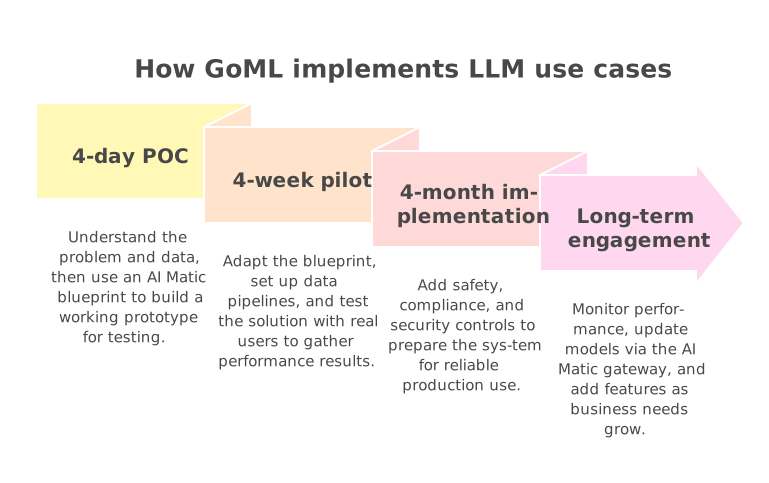
We follow a four-step approach using AI Matic, our platform of proven blueprints. Instead of starting from scratch, we use ready-made blueprints for common enterprise AI use cases. This saves around four to eight weeks of initial work for each build. With this approach, 82% of our POCs move to production.
Step 1: 4-day POC
The goal of a proof of concept is to check whether your use case works with your own data. First, we understand your problem, your data, and what you want to achieve. Then, our engineers choose a suitable AI Matic blueprint, such as conversational agents, search, agentic workflows, data analytics, content generation, or data synthesis, and use it to build the foundation of your solution.
Within four days, you get a working version of the solution. You can test it yourself instead of reviewing slides or mockups. This helps your team see how it works and decide whether to move forward.
What you get: A working prototype, early accuracy results using your data, and a clear idea of whether the use case is worth developing further.
Step 2: 4-week pilot
The pilot turns the prototype into a solution that real users can test. Our forward-deployed engineers adapt the blueprint to your needs, set up data pipelines, select and test suitable models, and add your business rules.
Since we start with proven blueprints, solutions can reach more than 90% accuracy on day one. We continue to improve performance using feedback from real users. We also compare accuracy, speed, and cost to help you understand how the solution is likely to perform at a larger scale.
What you get: A working solution tested by real users, clear performance results, and a business case for a full rollout.
Step 3: 4-month implementation
At this stage, we prepare the solution for production. Our engineers add safety checks, compliance controls, and human review steps where people need to check AI-generated results. We also test monitoring systems, security measures, and access controls before launch.
The goal is to build a system that works reliably at scale, maintains more than 95% accuracy, and uses tokens efficiently to keep costs under control as usage grows.
What you get: A secure, compliant AI system ready for production and connected to your existing workflows. You also own the code and can update or extend it as needed.
Step 4: Long-term engagement
Launching the solution is only the beginning. AI models keep changing, and your business needs may grow over time. We continue to monitor performance, improve accuracy, and add features as your requirements change.
AI Matic includes a model gateway that supports virtually any model provider. This lets us move your solution to newer, better, or cheaper models without rebuilding it from scratch. Many clients also expand to new use cases by combining multiple blueprints into one system.
What you get: Ongoing improvements, the flexibility to use better models, and continued support as you expand AI across your business.
Frequently asked questions
What are the most practical LLM use cases today?
The most useful LLM applications are those that save time on daily tasks involving text and information. Common examples include customer support chatbots, document summaries, extracting data from forms and contracts, searching company documents, creating content, and helping developers write code. Businesses are also using AI agents to handle tasks with multiple steps, such as processing work orders and managing orders from start to finish.
Which LLM use cases should teams pilot first?
Start with a use case that solves a clear problem, has enough data available, and carries little risk if the AI makes a mistake. Good options for a first pilot include searching internal documents, summarizing files, and answering common customer questions. These use cases can show measurable results quickly and help your team gain confidence before moving to more complex or high-risk projects.
When should teams use RAG instead of fine-tuning?
Use RAG (retrieval-augmented generation) when a model needs to answer questions using your company’s information, such as internal policies, product details, or frequently updated documents. It retrieves relevant information for each query, helping the model give accurate answers without retraining. Fine-tuning is useful when you need the model to follow a specific writing style, output format, or domain-specific patterns that prompts and RAG alone may not handle well. Most teams start with RAG and consider fine-tuning when they need more specialized results.
How are LLMs different from traditional AI?
Traditional AI uses fixed rules or learns from labeled data to perform specific tasks, such as detecting fraud or predicting demand. LLMs are trained on large amounts of text and can handle different language tasks using one model, including writing, summarizing, answering questions, and generating code. Traditional AI is often better suited to structured data and decisions that need clear explanations, while LLMs work well with unstructured data like emails, documents, and conversations. Many businesses get better results by combining both approaches.
What should teams verify before moving to production?
Before launching, test the solution with real examples from your daily work instead of relying on a few sample prompts. Check whether the answers are accurate, complete, and relevant, and how well the system handles unusual cases. Make sure response times and costs fit your expected usage. Also, put safety checks, security controls, and data privacy measures in place. For high-risk decisions, include human review and set up monitoring to track performance after launch.