TLDR
- AWS Emulator serves AWS API calls from one local HTTPS endpoint, with no AWS account and no resources to provision.
- Agents create, find, update and track tickets by chatting with a Claude Haiku 5.5 assistant, and every change waits for human approval.
- Amazon DynamoDB, Amazon S3 and Amazon SQS ran entirely on the emulator, and all 14 integration tests passed in 0.70 seconds.
- IAM, performance and real model inference still need an AWS test account, so Amazon Bedrock calls stayed on AWS.
If you’re part of an engineering team building on the cloud, you’re well aware that integration testing has always presented a stubborn trade-off: you either deploy to a live sandbox environment and face slow feedback cycles + cloud costs, or rely on mock interfaces that fail to capture real-world edge cases. Cloud integration bugs frequently surface late in the delivery pipeline - right when local code first interacts with real cloud infrastructure.
AWS Emulator directly addresses this challenge. Developed and released by AWS as a local API emulator, it brings rich integration verification straight to the developer's workstation. To test its real-world capabilities, I put AWS Emulator to work on a production-grade support desk application. The goal was simple and straightforward - evaluate exactly how much of a modern AWS cloud stack can be thoroughly verified locally before deploying to a live account.
In this article, I shall share key architectural insights from the hands-on evaluation. The blog details out what AWS Emulator is, how it integrates into automated delivery pipelines, the chat-driven AI ticketing platform that was built and the exact findings from our integration suite against AWS Emulator version 1.0.336.
What is AWS Emulator
AWS Emulator is a local program that serves AWS API endpoints for testing. The AWS CLI and AWS SDKs talk to it the same way they talk to AWS, so application code stays unchanged and only the endpoint differs. It installs as a Linux package, runs in Docker on macOS and Windows and can run inside Rust test processes. AWS charges no service fee for it, and requests, responses and resource data stay on the machine.
Three details make it behave like a real endpoint. Each run generates fresh access keys and requires Signature Version 4 signing, which blocks stray requests from other local programs. It serves HTTPS with its own per-run certificate. Every request resolves to one account, 000000000000, so aws sts get-caller-identity shows at a glance whether a shell is talking to the emulator or to AWS. Resources live in memory and disappear when the emulator stops.
Where AWS Emulator fits
AWS positions the emulator for local testing of code that interacts with AWS services, running integration tests in CI/CD pipelines without an AWS account, and prototyping with AI coding agents. AWS also updates it multiple times a day. Its documented limits matter just as much: it does not evaluate IAM or resource policies, keeps a single Region and account, varies in fidelity by service, and is not built for load testing. My team treated it as a fast, disposable integration environment and planned an AWS test account for everything outside that scope.
The experiment: A production-grade support desk
We built Support Desk, an AI-assisted ticket system for a customer-support team. Agents log tickets, set priorities and owners, discuss work in comments, attach files and follow activity. A React and Vite interface calls a FastAPI service, which uses Boto3 for every AWS call. A seed script loads 105 fictional tickets so filters, metrics and paging work against realistic volume.
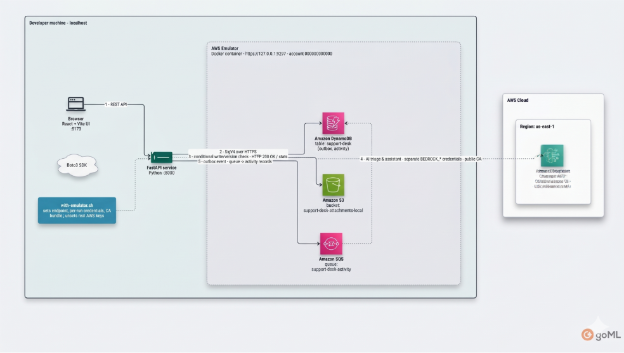
Figure 1. Support Desk architecture. Storage and messaging run on AWS Emulator; AI triage calls Amazon Bedrock on AWS.
Inside the system: A chat-driven ticket desk
Support Desk gives agents two ways to work the queue. The web interface covers an overview dashboard, a filterable ticket list, and ticket pages for conversation, files, activity and AI triage. A chat assistant does the same work in plain language: an agent can type “Which urgent tickets have no owner?”, “Open a ticket for a customer locked out of SSO” or “Move the checkout ticket to in progress and assign it to Priya”.
The assistant runs on Claude Haiku 5.5 through the Amazon Bedrock Converse API and works through four narrowly scoped tools. FastAPI validates every tool argument against a strict schema before anything runs.
Reads answer straight away and writes wait for a person. A create or update becomes a proposal card with a single-use token that expires after ten minutes, and nothing changes in DynamoDB until the agent selects Approve. Update proposals carry the ticket version they were based on, so if a colleague edits the ticket first, the confirmation returns HTTP 409 and their work stays intact. The transcript streams each step (“Searching tickets”, “3 tickets found”), customer email addresses are removed from tool results before they reach the model, and ticket text is treated as untrusted data. On a single ticket, AI triage suggests a summary, category, priority and draft reply; applying the priority takes an explicit click, and drafts are never sent automatically.
Every tool calls the same API functions as the web interface, so a ticket created in chat writes to emulated DynamoDB and its event travels through emulated SQS into the activity timeline. Only the model call leaves the machine, and the chat tests replace the model with scripted tool calls so the whole loop runs offline against the emulator.
To ensure enterprise safety, read requests process immediately while write operations require human verification. Proposed actions generate card UI components containing single-use authorization tokens that expire after 10 minutes; no state changes touch DynamoDB until an agent explicitly clicks Approve. Furthermore, proposal cards embed the ticket version number at draft creation. If a colleague updates the ticket in the interim, the submission yields an HTTP 409 conflict, preventing overwrite bugs. Data privacy controls sanitize customer email addresses before context reaches the LLM, and ticket text is handled as untrusted input. Automated triage suggestions - including summaries, categories, and draft responses – never perform automated dispatch without agent consent.
Essentially, both the web frontend and AI tools execute against identical backend service abstractions. A ticket created in chat writes directly to emulated DynamoDB, emitting events to emulated SQS that feed into the timeline auditor. Only live AI model calls leave the machine; in test suites, LLM invocations are mocked with deterministic tool outputs to keep the entire integration testing loop offline and lightning-fast.
Wiring the Architecture to AWS Emulator
We built the container image from the Dockerfile AWS publishes, bound it to 127.0.0.1:9297 so no other machine on the network could reach it, capped memory at 2 GiB and turned telemetry off. A small wrapper script prepares each shell before any test or server starts:
unset AWS_ACCESS_KEY_ID AWS_SECRET_ACCESS_KEY AWS_SESSION_TOKEN AWS_PROFILE
export AWS_ENDPOINT_URL=https://127.0.0.1:9297
export AWS_SHARED_CREDENTIALS_FILE=$EMU/9297/emulator_credentials
export AWS_CONFIG_FILE=$EMU/9297/config AWS_CA_BUNDLE=$EMU/9297/ca.pem
export AWS_DISABLE_HOST_PREFIX_INJECTION=true AWS_REGION=us-east-1
Clearing real credentials comes first because environment variables outrank the credentials file, and a leftover key would sign requests with a real identity. As a second guard, the FastAPI storage client refuses to start unless its endpoint is the local emulator, so the application has no route to a real DynamoDB table.
Amazon Bedrock needed the opposite setup. AWS_CA_BUNDLE replaces the trusted certificate store, so any client in the same process would stop trusting AWS. The Bedrock client therefore gets its own regional endpoint, a public CA bundle and separate BEDROCK_* credentials, and the two clients never share configuration.
What we tested and what we found
The integration suite runs the real FastAPI application against the emulator. On AWS Emulator 1.0.336, all 14 tests passed in 0.70 seconds on an Apple silicon laptop, fast enough to run on every save. These checks told us the most:
- Optimistic concurrency. Every update carries a version number inside a DynamoDB condition expression. A stale write raised ConditionalCheckFailedException, which the API returns as HTTP 409, the same lost-update protection we rely on in production.
- Pagination. DynamoDB filters after it reads a page, so the API reads ahead and returns an opaque cursor. Following the cursor reached the final page and returned every ticket the test created.
- Files. Attachments round-tripped through S3 byte for byte, and the API rejected disallowed file types and empty files before writing anything.
- Queue recovery. With SQS publishing forced to fail, the event waited in a DynamoDB outbox. The next processing run delivered it and cleared the outbox, and event IDs keep activity writes idempotent when a message arrives twice
We also probed the emulator's AI APIs. Bedrock Converse and InvokeModel accepted well-formed requests and replied that no language model runs in the emulator, and Amazon Translate returned the input behind a placeholder tag. An HTTP 200 from an emulated AI service confirms the request shape and nothing more, which is why the assistant and AI triage call Amazon Bedrock on AWS while everything else stays local.
Clearing existing AWS credential environment variables is a mandatory safeguard, as environment variables override file configuration and could otherwise cause SDKs to sign requests with production IAM identities. Additionally, the FastAPI storage module includes a startup check that fails fast if the configured storage endpoint points anywhere other than localhost, preventing accidental interaction with real DynamoDB instances.
Connecting to Amazon Bedrock required a dual-client strategy. Because AWS_CA_BUNDLE forces HTTP clients to trust the local emulator certificate, shared process clients would fail SSL validation when calling public AWS endpoints. To resolve this, the Bedrock client is configured separately with standard public CA bundles and dedicated BEDROCK_* credentials, cleanly isolating live LLM traffic from emulated data-plane operations.

Empirical Test Results and Findings
Our automated integration suite executes the full FastAPI application against AWS Emulator 1.0.336. On an Apple Silicon developer laptop, all 14 integration tests passed in just 0.70 seconds – fast enough to run continuously on file save. Key test verifications included:
- Optimistic Concurrency Control: State modifications pass version attributes into DynamoDB condition expressions. Outdated writes successfully triggered ConditionalCheckFailedException, returning HTTP 409 and validating our production lock logic.
- Query Pagination & Cursors: DynamoDB evaluates filter expressions post-page-read. The API correctly generated and traversed opaque pagination tokens across multi-page datasets until reaching completion.
- S3 Binary Attachment Handling: File attachments round-tripped through emulated S3 with perfect bitwise integrity, while pre-upload validation correctly rejected invalid MIME types and zero-byte payloads.
- Queue Recovery & Idempotency: Simulating SQS connection failures verified our outbox pattern; events buffered cleanly in DynamoDB and drained correctly upon recovery without creating duplicate timeline entries.
Our testing also delineated clear boundaries regarding emulated AI services. Calls to Bedrock Converse and InvokeModel within the emulator returned HTTP 200 responses containing static placeholder text indicating that actual foundation models do not execute locally. Thus, while AWS Emulator is ideal for structural request/response verification, live LLM reasoning and agent evaluation must route to Amazon Bedrock in a real AWS environment.
Strategic Recommendations: Integrating AWS Emulator
AWS Emulator now runs in this project's development loop and test pipeline. It catches wiring, request-shape and error-handling mistakes in seconds, gives every test run a clean state, and keeps tests away from shared AWS resources. Keep an AWS test account for IAM policies, multi-Region behavior, performance, cost and AI model quality, and pin the emulator version in CI because it updates daily.
As an AI software development company building on AWS, GoML uses the same split for client systems: emulate the data plane for speed, and validate models and security on AWS. If you are planning an AI-assisted support workflow, reach out to our experts and let’s get you started today.