If you built anything on SageMaker even two years ago, the platform you'd log into today looks different. What started as a single ML development service has grown into a foundation-model and agent-building platform, with new deployment paths, a renamed core service, and new foundation models added every month.
With Amazon SageMaker AI, you can:
- Prepare data using built-in processing and transformation tools.
- Build models using popular algorithms, custom code, or pre-trained foundation models.
- Train and fine-tune models at scale without managing infrastructure.
- Deploy models to production with auto-scaling.
- Monitor performance in real time.
In 2024, AWS renamed the original service Amazon SageMaker AI and introduced SageMaker Unified Studio, a broader workspace that layers SageMaker AI together with Amazon Athena, AWS Glue, Amazon EMR, Amazon Redshift, and Amazon Bedrock for teams that also need data engineering and analytics in one governed project. If your focus is building and deploying ML and generative AI models, SageMaker AI is the piece that matters, and everything below applies directly.
This guide covers SageMaker's key features, how to build high-efficiency ML models on it, and how to skip the build-from-scratch path using SageMaker JumpStart, including a look at one of its newest additions: NVIDIA's Nemotron 3.5 Lightning, an open model built for high-volume AI agents.
Key features of Amazon SageMaker AI
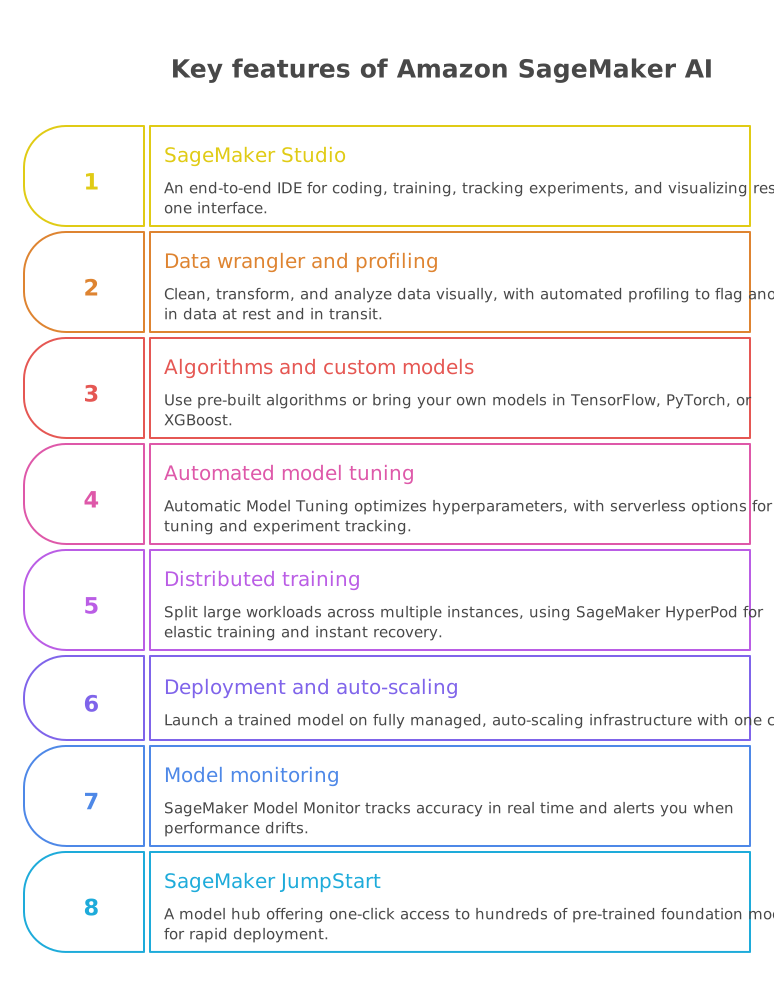
1. SageMaker Studio: An end-to-end IDE for coding, training, tracking experiments, and visualizing results in one interface.
2. Data wrangler and automated data profiling: Clean, transform, and analyze data from multiple sources visually, cutting into the roughly 80% of project time typically spent on data prep. SageMaker Unified Studio's catalog now profiles tables automatically, building a baseline of expected behavior and flagging anomalies, for data at rest and in transit through Visual ETL jobs, without you having to define fixed thresholds.
3. Built-in algorithms and custom models: Pre-built algorithms cover classification, regression, and clustering, or bring your own models in TensorFlow, PyTorch, or XGBoost and scale them with ease.
4. Automated model tuning: Automatic Model Tuning searches and optimizes hyperparameters for you. Newer serverless options extend this further: serverless fine-tuning removes the need to provision infrastructure yourself, and serverless MLflow spins up in minutes and scales automatically for experiment tracking.
5. Distributed training: Split large training workloads across multiple instances to cut training time and cost. SageMaker HyperPod recently added checkpointless and elastic training, letting jobs recover instantly from hardware failures and scale automatically based on available capacity, cutting down on wasted compute for long training runs.
6. One-click deployment and auto-scaling: Launch a trained model on fully managed, auto-scaling infrastructure with one click.
7. Model monitoring. SageMaker Model Monitor tracks accuracy in real time and alerts you when performance drifts.
8. SageMaker JumpStart: A model hub inside SageMaker AI offering one-click access to hundreds of pre-trained foundation models, spanning language, vision, speech, and document processing, all deployable from Studio, the SageMaker SDK, or a model's Hugging Face page.
AWS adds new models to the catalog on a near-weekly basis; in 2026 alone it has grown to include agentic coding, multilingual reasoning, OCR, and text-to-speech models. For teams that want to skip training entirely, JumpStart is often the fastest path to a production endpoint. NVIDIA's Nemotron 3.5 Lightning, covered next, is a good example of what that looks like in practice.
NVIDIA Nemotron 3.5 Lightning: A SageMaker Jumpstart foundation model for agentic workloads
What it is: Nemotron 3.5 Lightning is distilled from NVIDIA's larger Nemotron 3 Ultra, using a hybrid Mixture-of-Experts architecture with 30 billion total parameters but only 3 billion active per forward pass, letting it run on a single GPU instead of a multi-GPU cluster. Because it's a fully open model, teams can post-train it with their own data using NVIDIA NeMo and deploy the resulting weights wherever their agents run.
NVIDIA has also published benchmarks (including MMLU Pro, GPQA Diamond, and SWE-bench Verified) comparing full-precision and lower-precision NVFP4 variants, useful mainly for teams choosing between the two on cost and latency grounds rather than a reason to pick Lightning over a frontier model in the first place.
Why it matters: Always-on AI agents don't need frontier-level reasoning for every step. Planning a workflow or coordinating sub-agents benefits from a large, general-purpose model, but classifying an alert, extracting fields from a document, or checking a record against policy is often work a smaller, specialized model handles just as accurately, at a fraction of the cost and latency. This "system-of-models" approach routes each step to the right-sized model, and Lightning is built for the high-volume end of that system.
Where it fits: financial document extraction and policy checks, cybersecurity alert triage, retail catalog and inventory questions, telecom alarm triage, and long-running personal or enterprise assistants that don't need a frontier model running every step.
This is close to what we've seen in production ourselves. GoML built an AI-powered transaction monitoring tool for fraud detection on exactly this kind of high-volume, repetitive checking, the same profile Lightning is built for. If you're mapping out where a model like this could fit into your own agent stack, our Agentic AI Accelerator team can help you design a system-of-models approach around your workflows.
Deploying it: From SageMaker Studio, open SageMaker JumpStart, search for "Nemotron 3.5 Lightning," select the model card, choose a GPU instance (for example, ml.g6e.24xlarge), and deploy. Or, with the SDK:
python
from sagemaker.jumpstart.model import JumpStartModel
model_id = "huggingface-reasoning-nemotron-3-5-lightning-30b-a3b-nvfp4"
model_version = "*"
model = JumpStartModel(model_id=model_id, model_version=model_version)
predictor = model.deploy()
Run predictor.delete_endpoint() once you're done testing, since the endpoint bills while it's running.
Connecting SageMaker AI to a unified data foundation
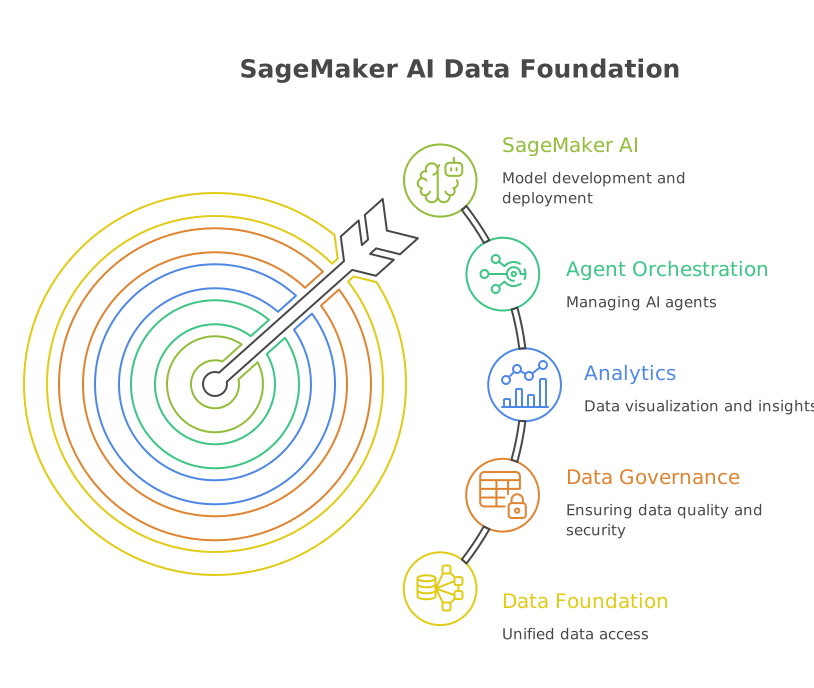
A model is only as good as the data it can reach, and most enterprises have data scattered across on-premises systems, multiple clouds, and SaaS tools like Salesforce. AI agents make this harder to ignore than traditional analytics did, since they need unified, governed, real-time access to relevant data wherever it lives.
AWS's answer is an open lakehouse built on Apache Iceberg, with AWS Glue Data Catalog and AWS Lake Formation providing unified metadata and consistent governance across sources. It connects data through catalog federation (for Iceberg-compatible platforms like Databricks or Snowflake), query federation (for platforms like Google BigQuery, via Amazon SageMaker Lakehouse architecture or AWS Glue connectors), or ingestion (via Zero-ETL, Glue, or EMR) for data agents need to access frequently and fast.
SageMaker AI sits on top of this foundation as the model development and deployment layer, alongside Amazon Bedrock AgentCore for agent orchestration and Amazon Athena or QuickSight for analytics. Lake Formation's fine-grained access control applies whether a query comes from a person or an AI agent, and SageMaker Unified Studio's data lineage tracking extends that same auditability to agent queries specifically. The practical takeaway: the model is rarely the hard part of an agentic AI project. Getting clean, governed access to data scattered across clouds and SaaS tools usually is.
Why AWS SageMaker is ideal for developing high-efficiency ML models
1. Cost-effectiveness. Pay-as-you-go pricing, plus Managed Spot Training for further savings on training jobs that can tolerate interruption.
2. Accessible to different skill levels. A data scientist can bring a custom model and train it from scratch; a developer with no ML background can deploy a JumpStart model without training one at all. Both run on the same managed infrastructure.
3. Security and compliance. IAM, VPC, and encryption in transit and at rest, with compliance support for HIPAA, GDPR, and SOC, making SageMaker suitable for regulated industries like healthcare and finance.
How to develop high-efficiency ML models with AWS SageMaker
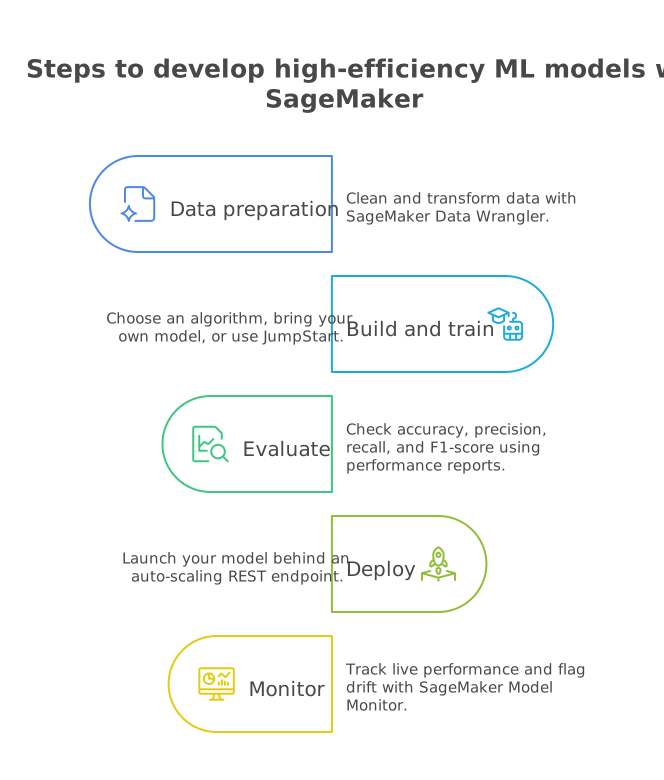
Step 1: Data preparation. Clean and transform data with SageMaker Data Wrangler. In SageMaker Unified Studio, this happens inside the same project as the rest of your pipeline, sharing one data catalog with your notebooks and ETL jobs.
Step 2: Build and train. Choose a built-in algorithm, bring your own model, or start from a JumpStart model and skip training altogether. SageMaker Experiments tracks versions across all three paths, and SageMaker now supports multiple notebook spaces per project plus scheduled notebook runs for recurring jobs like nightly retraining.
Step 3: Evaluate. Check accuracy, precision, recall, and F1-score using SageMaker's built-in performance reports.
Step 4: Deploy. One-click deployment launches your model behind an auto-scaling REST endpoint, ready to integrate with your applications.
Step 5: Monitor. SageMaker Model Monitor tracks live performance and flags drift, so you can retrain and redeploy with minimal downtime.
Real-world use cases of AWS SageMaker
- Workday gives engineers shared SageMaker Studio access to build and deploy models, including LLMs, without managing infrastructure themselves.
- Sophos uses distributed training and automatic tuning to retrain a lightweight cybersecurity detection model that's dramatically smaller than its predecessor.
- Tyson Foods runs image classification to spot products missing package labels on the production line.
- Dovetail uses JumpStart for contradiction detection and semantic search across legal documents, a real production example of the JumpStart shortcut covered above.
Between them, these examples span cybersecurity, HR software, food manufacturing, and legal tech, which is a fair reflection of how broadly SageMaker gets used today, well beyond its original data-science-team roots.
Final thoughts
SageMaker AI has evolved from a single machine learning development tool into a complete ecosystem where custom and pre-built models, such as Nemotron 3.5 Lightning, can now be built, deployed, and monitored. It is crucial to comprehend when to get models built and when to work with JumpStart, and it is equally important to learn how to make sure that data drawn upon while doing either is organized and regulated.
If you're weighing that build-versus-deploy decision for your own workflows, explore our AWS AI Services to see how we help enterprises build production-grade ML and agentic systems on SageMaker and the rest of the AWS AI stack.
Frequently asked questions
1. Is SageMaker becoming obsolete as AWS puts more focus on Bedrock for generative AI?
No. The two services handle different workloads. Bedrock is designed for accessing and orchestrating foundation models through APIs, while SageMaker remains suited to custom model training, fine-tuning on proprietary data, and running open models with greater infrastructure control. Many enterprise architectures use both.
2. When should teams use a smaller model like Nemotron Lightning for an AI agent?
Smaller models make sense for repetitive tasks that do not require advanced reasoning, such as alert triage, data extraction, classification, and policy checks. Teams can route these tasks to a lower-cost model and reserve larger models for planning, coordination, and harder reasoning steps. This keeps agent operating costs under control as request volumes increase.
3. What is usually the biggest bottleneck in SageMaker ML projects, the model or the data?
For many teams, the harder problem is the data. Preparing clean, governed, near-real-time information across on-prem systems, cloud platforms, and SaaS applications often takes more work than choosing or training the model. This is why AWS has expanded the data, lakehouse, and catalog capabilities around SageMaker AI.